 Science To Fit
The science › Nutrition › Calories and body weight
How to use Plan my meals
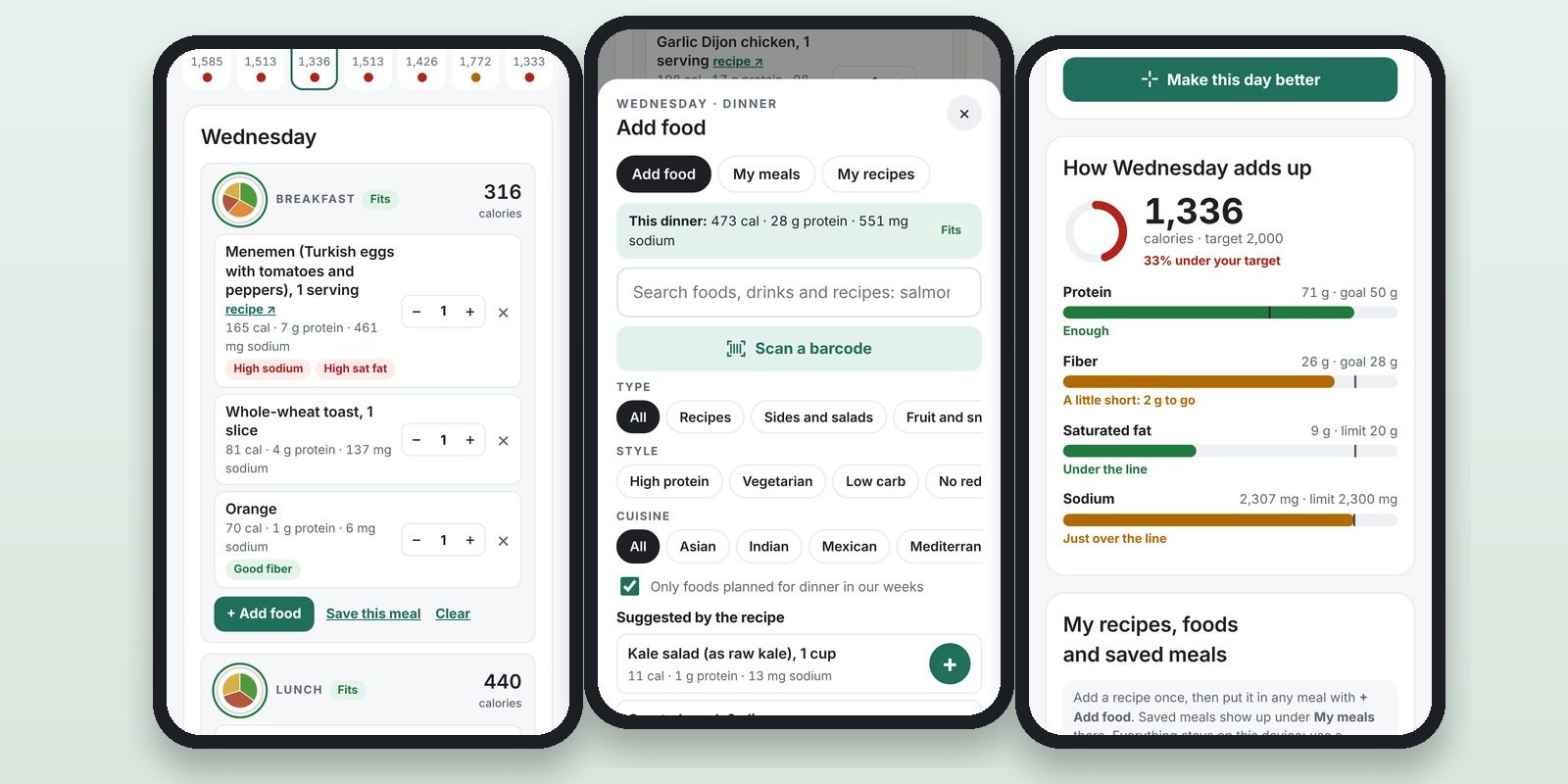
Plan my meals starts you with a full week of real meals, then shows what each change does to your calories, protein, fiber, saturated fat and sodium, so you can shape a week you'll actually eat.
Why it matters: Most meal plans hand you a menu and stop there. This one lets you start from how you already eat, swap one meal at a time, and see the numbers move as you go. Results that last come from habits you can keep up, so a plan built from food you already like is easier to stick with (see "Keeping weight off").
Go deeper
What it is:
- A week of breakfasts, lunches, dinners and snacks, plus an optional extras slot for fruit, nuts or a drink.
- Every meal is a list of foods you can resize, remove or add to.
- No sign-up and no personal details. Your week stays on your phone, tablet or computer.
What it isn't:
- A diet you have to follow. The starting weeks are examples to change, not prescriptions.
- Exact. The numbers come from USDA data and each recipe's own nutrition card, so treat them as close estimates.
- A medical plan. If a doctor or dietitian has given you a diet for a health condition, such as kidney disease or diabetes treated with insulin, follow their plan and use this one only with their OK.
Start in five minutes
- Pick a starting week. Choose the one closest to how you eat now: - How most people eat: the average American week, with three meals out. A good "before" picture. - Everyday mix: familiar American food, a few Mediterranean dishes and one pizza night. - High protein: about 30 g or more at lunch and dinner, mostly from food. - Vegetarian: protein from tofu, tempeh, lentils, beans and eggs. - Low carb: 15 g net carbs or less per meal. - No red meat: chicken, turkey, fish and vegetarian meals. - Mediterranean: top-rated Mediterranean dishes, each with a side.
- Set your calories. Pick Small (1,600), Average (2,000) or Big (2,400). For your own number, run the calorie calculator first; the planner then uses its calorie and protein targets (see "Calories and energy balance").
- Look at one day. Each meal shows its calories and a label: Fits, Close or Doesn't fit. When a meal doesn't fit, a line underneath says why and which food is the biggest reason.
- Change what you'd change in real life. Use − and + to resize a food, × to remove it and + Add food to add one. Clear empties a meal.
- Check the day's gauges. "How Monday adds up" compares the day with your targets for calories, protein, fiber, saturated fat and sodium.
- Let it suggest one swap. Make this day better finds the single meal swap that helps the day most. With the Vegetarian or No red meat week, it only suggests meals that fit that style.
- Look at the week. Switch Show to Week to see all 28 meals at once, how many fit, and how your week compares with the average American's.
What the checks mean
The daily lines (with the 2,000-calorie Average setting):
- Sodium: under 2,300 mg a day at every calorie level (see "Salt and blood pressure").
- Saturated fat: under 10% of calories. The planner uses the label's Daily Value, 20 g at 2,000 calories (see "Are seed oils bad for you?").
- Fiber: 14 g per 1,000 calories, so 28 g at 2,000 (see "Fiber").
- Protein: at least 50 g, or the calculator's target if you set one (see "The protein dose").
A meal "fits" when it has 900 mg of sodium or less and 6 g of saturated fat or less (300 mg and 3 g for a snack), and nothing from the "keep to a minimum" list.
- These per-meal numbers are our planning split of the daily limits, not limits tested meal by meal. They make it easy to see which meal is pushing the day over.
- Close means a little over: up to 1,300 mg of sodium or 8 g of saturated fat.
The tags on each food:
- Good protein and Good fiber: more per calorie than your daily target needs.
- High sodium and High sat fat: at least 1½ times your daily limit per calorie.
- Limit: foods the Mediterranean pattern keeps to a minimum: processed meat, sweets, fried snacks, sugary drinks and alcohol (see "Ultra-processed foods" and "Alcohol and health").
Find foods to add
Tap + Add food on any meal. Then:
- Search by name. Results include our recipes and about 5,300 USDA foods, as Americans buy and cook them.
- Type narrows the list: recipes, sides and salads, fruit and snacks, drinks, beer and wine, eating out or everyday foods.
- Style keeps to high protein, vegetarian, low carb or no red meat. Fits the pattern shows only foods that keep the meal fitting.
- Cuisine narrows recipes to Asian, Indian, Mexican, Mediterranean or plant-based.
- Only foods planned for dinner in our weeks (or breakfast, lunch or snack) keeps the list to foods our starting weeks use at that meal. Turn it off to see everything.
- Get recipe ↗ opens the recipe on its own site. The planner keeps the name, serving size and nutrition; the cooking steps live with the recipe.
- Scan a barcode reads a packaged food's label with your phone's camera. Only the barcode number is looked up; the camera image stays on your phone.
Make it yours
- Save this meal keeps a meal you like. Add it to any day from My meals in Add food.
- + Recipe from a website: paste a recipe's link, and the planner reads its nutrition card. Check the numbers before saving.
- + Build a recipe from ingredients: add USDA foods and amounts, and the planner adds them up per serving.
- Fill to my target tops up the extras slot with fruit, yogurt, nuts or milk when your meals come in under your calories.
- I cook lower-sodium recalculates many recipes with low-sodium broth, no-salt-added canned beans and tomatoes, reduced-sodium soy sauce and half the salt. Each recipe shows its swaps.
Keep your plan
- It saves as you go, on this device only.
- Save a backup file now and then. Browsers can clear a site's saved data, especially if you don't visit for a while. Download backup saves your week, recipes and saved meals; Restore from backup brings them back.
- To use another device, download a backup, send it to yourself (AirDrop or email) and restore it there.
If food or weight feels out of control: If you're restricting hard, bingeing, purging, or exercising to make up for eating, talk to your doctor or call the National Alliance for Eating Disorders helpline at 1-866-662-1235 (weekdays, staffed by licensed therapists).
Your first week checklist
- Pick the starting week closest to how you eat now.
- Set your calories: Small, Average, Big, or your own from the calculator.
- Change one meal a day to something you'd really eat.
- Use Make this day better on your weakest day.
- Check the week view: aim for more meals that fit than last week, not all 28.
- Save the meals you like, and add one recipe of your own.
- Download a backup.
Related guides
- Reading a Nutrition Facts label
- Healthy eating on a budget
- Adding fiber and fermented foods
Related articles
- Calories and energy balance
- The protein dose
- Comparing diet patterns
- Are seed oils bad for you?
- Salt and blood pressure
- Fiber
- Ultra-processed foods
- Keeping weight off